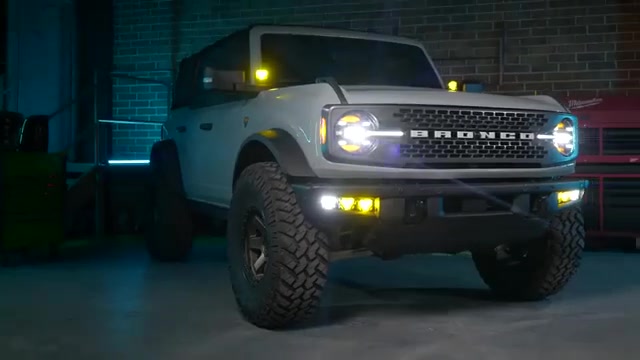
What’s up guys, welcome back to Morimoto Lighting. In this build we are giving a 2021 and up Ford Bronco that after-market off-road look with the Morimoto 4Banger pod lights. We tested both application levels, walked through the A-pillar ditch light setup, and installed the fog light replacement kit from start to finish. If you want more brightness and a serious upgrade over the factory setup, this is the guide for you. Below we break down the product options, the tools you need, and every step we took during the install.
Morimoto 4Banger Overview: NCS vs HXB
Before we get into the install, let us tell you what these things are all about. The 4Banger comes in two different levels. The entry-level version uses a Nichia chip, and we call this the NCS version. The secondary level is for the premium users, the off-roaders, the top dog of pod lights. That application uses the Osram chip, and we call it the HXB or the HX Boost. Both are strong performers, and the level you pick just depends on how much output you are chasing.
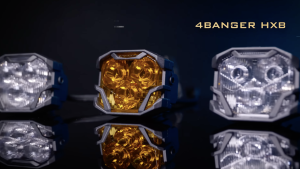
Once you decide what application level you want, you move on to the beam pattern. There are three patterns to choose from: spot, wide, or combo. All three patterns come in an amber or white color. If you are shopping for the premium option, you can check out the 4Banger HXB Wide Beam LED pod lights to see the top-tier configuration we used in this build.
Beam Patterns: Spot, Wide, and Combo
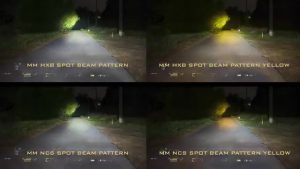
With the wide pattern, many people are drawn to it to help increase night visibility and to use it as a fog light replacement. No matter if you choose the NCS or the HX Boost pod light, you will experience the same driving beam pattern. The combo beam pattern is a super cool spot beam with a little bit more fill, and it stacks up to the competition very well. The spot beam is an incredibly bright, tight pattern that looks like a square. That is done on purpose because we at Morimoto know a thing or two about beam patterns.
Color Options and Output
All three patterns come in either a white or amber color, but one thing to note is your light output will be a little bit less with the yellow lenses. On the higher end, the HXB uses the Osram chip, but it does not come in yellow. The white light has to pass through the yellow lens and loses about 30 percent of its brightness. It is still an incredible option. Something neat about the entry-level NCS is that those Nichia chips do come in a yellow option. Having a yellow light pass through a yellow lens means it does not lose as much, so the light output is closely matched to that of the white counterpart.
Footprint and Street-Legal Compliance
The overall footprint of the 4Banger is approximately 30 percent smaller than alternatives that offer comparable performance. This allows for an unbeatable fitment when paired with Morimoto’s fog light or A-pillar mounting kits. With a standard and negative three degree aim, the beam pattern produced by the NCS wide beam model is designed to be compliant with the latest SAE F3 regulations for use as a street legal fog light, and the same goes for the HXB wides. Lastly, the Morimoto 4Bangers are backed with a limited lifetime warranty.
If you are shopping for these kits for your own Bronco, you can grab the Morimoto 4Banger Fog Lights for the 2021+ Bronco or the Morimoto 4Banger A-Pillar Ditch Light Kit for the Bronco. You can also find the same fog light kit through Headlight Revolution’s Bronco 4Banger fog light kit and The Retrofit Source’s Bronco 4Banger fog light option if you prefer those retailers.
Tools You Will Need
For this install, these are the tools we used: zip ties, a flashlight, a crimper, wire strippers, a pry tool, Torx Plus bits (T20, T30, and T40), a T30, a ratchet of your choice with an extension, and 8mm, 10mm, 13mm, and 17mm wrenches. You will also want a Phillips head screwdriver and some self-tapping screws. Have all of that laid out before you begin so you are not stopping mid-install.
Installing the A-Pillar 4Banger Kit
First things first, pop the hood. Your A-pillar kit comes with a relay harness. On the harness you will find a relay, a ground, a positive, two Deutsch connectors for light one and light two, and a switch harness. The kit includes a Morimoto switch which we did not use, but you have the option of using it if you do not want to use the upfitter switches that the Ford Bronco includes. If you skip the Morimoto switch, just disconnect it from the barrel connector and connect the aux wire instead. Make sure to tighten this down nice and secure so that no water gets into it later.
Mounting the Relay Harness
When installing the harness, mount your relay upright, not sideways and not upside down, so no water intrusion gets into it once the install is done. Using a self-tapping screw, mount your relay in the engine bay anywhere that is accessible. Then run light one up to the driver’s side A-pillar, and using the provided extension harness, connect it to light two and run it over to the passenger A-pillar. You can run this harness alongside the OEM harness and tidy it up at the end.
Wiring to the Upfitter Switches
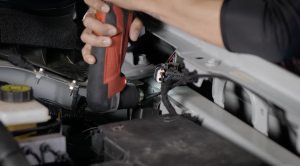
Now disconnect the negative terminal on the battery. With the battery disconnected, route the aux harness to your upfitter area. Splice off the end of the Morimoto aux wire and insert it into one end of a 20 gauge butt connector, crimp it down, and pull on it slightly to ensure it is secured. Take the brown wire, which is aux 4, and do the same steps to that wire. Keep in mind this may be different than your Bronco, so make sure to refer to your owner’s manual.
Mounting the A-Pillar Brackets and Pods
With the harness run, remove the two bolts on the A-pillar trim using a Torx Plus T30. Once those are removed, lift up on the plastic trim piece and pull your 4Banger harness up and out. Place your 4Banger into the A-pillar bracket. The flat piece of your bracket is labeled R or L, with R being your passenger side. Place your C bracket on there with the seat facing forward, then use the provided hardware starting with the bolt, then the washer, then the nut. Using a 17mm wrench, tighten it down but not fully yet so you can adjust it at the end.
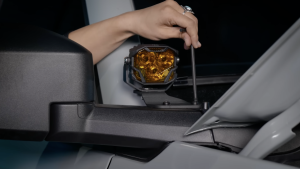
Take your 4Banger of choice and place it into the Morimoto universal bracket, lining up the two holes on the side. Using the provided hardware, tighten down the two T20 screws. This lets you adjust the vertical direction of your 4Banger at the end of the install. Connect your harness and install the A-pillar bracket onto your Bronco using the OEM bolts, then head over to the driver’s side and repeat the exact same steps. In our case, we went with the HXB yellow spot, but you can choose whatever variation you want when you purchase.
Installing the Fog Light Replacement Kit
The last bit is to connect power and ground for your A-pillars, but since we are doing the fog light replacements as well, we did that last along with the fog light relay. The fog light kit relay comes with two relay areas, a power and a ground, and six Deutsch connectors compared to the two on the A-pillar kit. It does not come with the Morimoto switch, only an aux harness so you can connect it into your upfitter switches.
Wiring the Fog Light Relay
Take another self-tapping screw and install your Morimoto relay. We installed ours right beside the A-pillar relay, but you can install it safely wherever you please. Strip back the Morimoto aux wire and crimp it into a butt connector, then locate the factory purple and green wire, which is aux 3.
Removing the Grille to Route the Harness
Next, run the harness. We removed the grille so we could route it nice and clean, though you do not have to do this step and can fish the harness through instead. Remove the nine plastic clips on the top of the grille with a pry tool. Then remove the plastic radiator cover and set it aside, disconnect the two connectors, and unscrew the four bolts. Pull out the grille and set it aside.
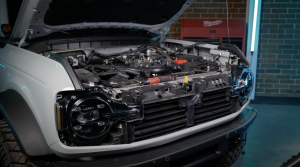
Take the longer part of the harness with the three Deutsch connectors and feed it through the opening where you can run it alongside your headlight and pull it through the bottom. Do the same thing to the driver’s side using the shorter part of the harness.
Building the Tri-Bracket
Now mount your triple 4Bangers into the fog light tri-bracket. The kit comes with a bigger bracket piece with C brackets and the provided hardware. You can choose whatever 4Bangers you want in this kit, mixing NCS or HXB, different beam patterns, and color variations. Start from outward to inward. The plate indicates left or right, with L being your driver’s side and R your passenger side. The outward C bracket is the smaller bracket of the kit. Line it up, add the washer then the bolt, and tighten it snugly toward the back of the bracket slot with a 17mm wrench but not all the way yet so you can adjust later.
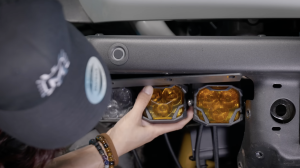
Take a 4Banger and the provided T20 screws and tighten them onto the Morimoto C bracket. Tighten these down pretty good because you will not have room to tighten them later, though you can still friction adjust at the end. Take the medium bracket and place it into the center slot, then install your 4Banger. Last, take the largest C bracket, install it into the inner slot, and repeat the same steps. As easy as that, your 4Bangers are mounted into the tri-bracket.
Mounting the Tri-Bracket to the Bumper
To mount the tri-bracket to the vehicle, you may or may not have to remove part of the bumper and trim, especially if you run bigger tires. Using a pry tool, remove the four plastic push tabs on the bumper, then lift up on the plastic cover and set it aside. Remove the three Torx Plus screws on the lower part of the bumper and the two on the upper part, then slide the outer piece up and out of the way. Remove the three T40 Torx Plus screws on the underside of the top of the bumper. Place your 4Banger tri-bracket in that area and tighten it down with the factory screws. Connect all three Deutsch connectors to the Morimoto harness and tuck everything in so it does not interfere with the suspension or wheels.
Final Power and Ground Connections
Head up to the battery. Unscrew the 10mm ground bolt and place both grounds onto that area and tighten it down. Then unscrew the positive bolt located beside the fuse box and place both positives there and tighten them down. With the harness fully installed, place the lid back onto your fuse box and reconnect the ground terminal onto your battery.
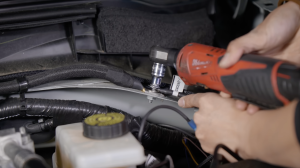
Once everything is installed and plugged in, test out all the functions and make sure the A-pillars and fog light replacements both turn on. Then button everything back up and use zip ties to keep the harness nice and clean. As easy as that, your Ford Bronco has been upgraded to one of the brightest pod light setups on the market today.
Frequently Asked Questions
What are the two versions of the Morimoto 4Banger pod light?
There is an entry-level NCS version that uses a Nichia chip, and a premium HXB (HX Boost) version that uses an Osram chip for higher output.
What beam patterns are available for the 4Banger?
Three patterns are offered: spot, wide, and combo. The wide pattern is popular for night visibility and as a fog light replacement, while spot is a tight square beam and combo blends spot with extra fill light.
Do the 4Bangers come in different colors?
Yes, all three beam patterns are available in white or amber. The HXB does not come in yellow directly, so white light passes through a yellow lens and loses about 30 percent brightness, while the NCS yellow option loses much less output since its LED chip is yellow to begin with.
Are the 4Banger wide beam lights street legal as fog lights?
Yes, with standard and negative three degree aim, the NCS and HXB wide beam patterns are designed to meet SAE F3 regulations for use as a street legal fog light.
What tools are needed to install the A-pillar and fog light kits on a Bronco?
The install requires zip ties, a flashlight, a crimper, wire strippers, a pry tool, Torx Plus bits (T20, T30, T40), a ratchet with extension, 8mm, 10mm, 13mm, and 17mm wrenches, a Phillips head screwdriver, and self-tapping screws.
Meet the Experts Behind Morimoto

Jimmy Nguyen – Engineering Manager
Jimmy leads engineering at Morimoto, bringing experience across customer support, supplier management, design engineering, and validation testing. His work ensures Morimoto lighting systems are engineered for real-world reliability and long-term performance.

Mike Hicks – Quality Control Manager
Mike oversees quality assurance at Morimoto, with a background spanning returns testing, RMA analysis, vendor quality control, and manufacturer scorecards. His focus is continuous improvement and accountability across the product lifecycle.